
Community
What Features Should You Look for in a Docking Station?
Choosing the right docking station can significantly enhance your productivity. It’s essential to understand what features to look for to ensure seamless integration with your devices and efficient performance. A well-chosen docking station provides versatility, improves workspace organization, and ensures all your devices remain connected and powered. This guide will walk you through the crucial aspects to consider, such as compatibility, connectivity options, power delivery, and additional functionalities. Whether you’re setting up a home office or enhancing your work setup, knowing these features will help you make an informed decision. Let’s dive into the key features that make a docking station a valuable addition to your tech arsenal.
Why is Compatibility Important?
Device Compatibility
Your docking station must support the devices you use. Check for compatibility with laptops, tablets, and other gadgets you plan to connect. Ensure the docking station supports the device’s model and brand. This compatibility guarantees that all your devices work seamlessly without any connectivity issues. Many docking stations are designed for specific brands like Samsung, HP, or Mac. Verify these details before purchasing to avoid any mismatch and ensure optimal performance.
Operating System Compatibility
Operating system compatibility is another crucial factor. Not all docking stations support every OS, such as Windows, macOS, or Linux. Ensure that the docking station you choose works well with your operating system. This compatibility ensures that all features and functions are fully supported, including drivers and software updates. Some docking stations might offer limited functionality if the OS compatibility is not checked beforehand.
Peripheral Compatibility
Consider the peripherals you plan to use, such as monitors, keyboards, mice, and printers. The docking station should support these devices through its ports and connections. Verify if it has enough USB ports, audio jacks, and other necessary inputs. This compatibility ensures a smooth workflow without the need for additional adapters or hubs. A well-matched docking station will provide a unified platform for all your peripherals, enhancing your workspace efficiency.
What Connectivity Options Should You Consider?
USB Ports and Types
USB ports are fundamental for connecting various devices. Ensure the docking station has multiple USB ports, including USB 3.0, USB-C, and USB-A. Different devices require different port types for optimal performance. USB-C ports are particularly important for modern devices, offering faster data transfer rates and charging capabilities. The availability of diverse USB ports ensures that you can connect all your devices without compromising speed or functionality.
HDMI and Display Ports
For those using multiple monitors, HDMI and DisplayPorts are essential. These ports allow you to connect your docking station to external displays, enhancing your productivity. Ensure the docking station supports high-resolution outputs, such as 4K, to maintain the quality of your visual work. Multiple display ports enable you to set up dual monitors or extended displays, providing a more expansive and efficient workspace.
Ethernet and Network Connections
Stable internet connectivity is crucial for productivity. Many docking stations come with Ethernet ports, providing a reliable wired internet connection. This feature is especially important for areas with weak Wi-Fi signals or for tasks requiring a stable internet connection, such as video conferencing or large file transfers. An Ethernet port ensures consistent and fast network access, reducing downtime and improving work efficiency.
How Does Power Delivery Impact Your Choice?
Charging Capabilities
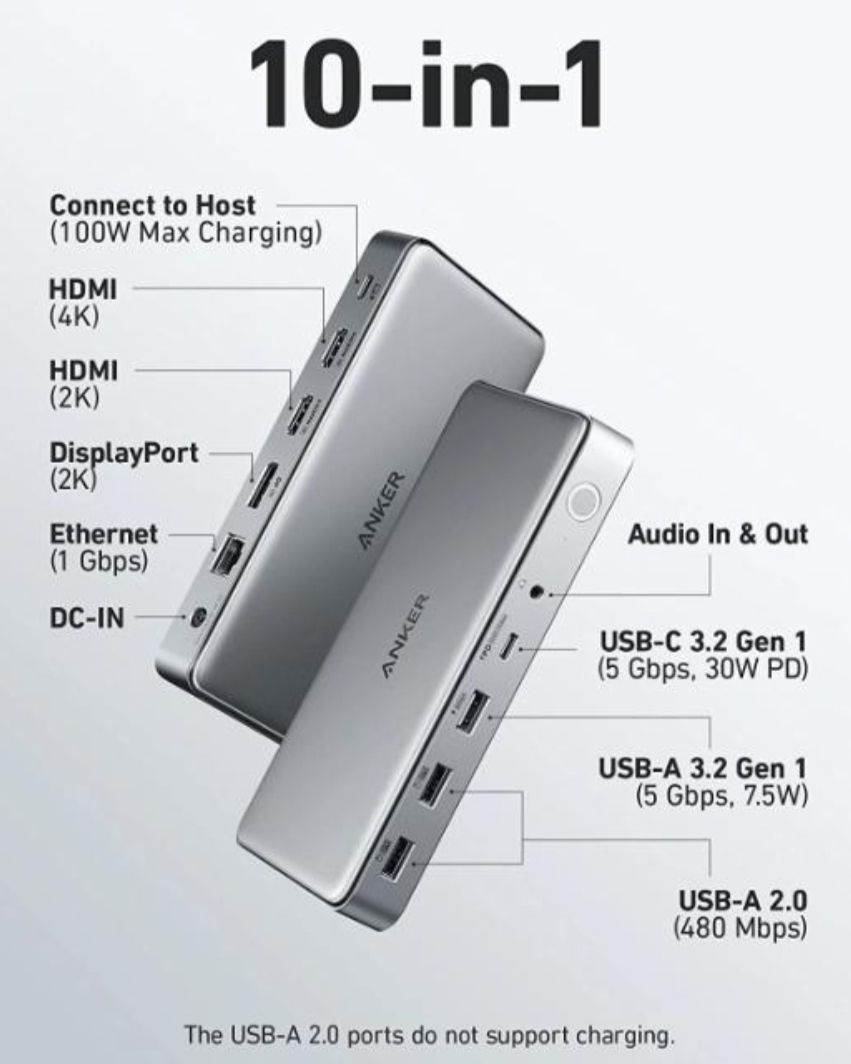
A docking station with charging capabilities can power your laptop and other devices simultaneously. Look for models with sufficient wattage to charge high-power devices. This feature eliminates the need for multiple chargers and keeps your workspace tidy. The docking station should provide enough power to charge your laptop while supporting other connected devices, ensuring everything remains powered throughout the day. For instance, the Anker 563 USB-C Docking Station (10-in-1) can power up your MacBook Air in less than 2.5 hours.
Power Pass-Through
Power pass-through allows the docking station to charge your devices even when it is not actively connected to a power source. This feature is useful for maintaining battery life and ensuring your devices are always ready to use. It also simplifies the charging process, as you only need to connect your laptop to the docking station without dealing with multiple power cords. The Anker 563 USB-C Docking Station also supports power delivery to give your iPhone 13 Pro a full charge in just over 1.5 hours, showcasing its efficient power pass-through capabilities.
Power Safety Features
Safety features protect your devices from power surges and overcharging. Look for docking stations with built-in surge protectors and overcharge prevention mechanisms. These features ensure the longevity of your devices and provide peace of mind. A good docking station will regulate power distribution, preventing damage to your devices from unexpected power fluctuations. Investing in a docking station with these safety features is crucial for protecting your valuable electronics. The Anker 563 also offers a 7.5W USB-A port to safely charge smaller devices like headphones and smartwatches.

What Additional Features Enhance Functionality?
Audio Output
Quality audio output is essential for video conferencing and media playback. Ensure the docking station has audio jacks or integrated audio output for connecting headphones or speakers. This feature enhances your multimedia experience and ensures clear audio during calls. The ability to connect high-quality audio devices can improve your work environment, making it easier to focus and communicate effectively.
Built-in Storage
Some docking stations come with built-in storage options, such as SD card readers or additional hard drive space. This feature provides convenient access to extra storage without the need for external drives. Built-in storage can simplify your workflow by keeping all necessary files and media easily accessible. It also helps in managing space, keeping your workspace organized and clutter-free.
Design and Portability
The design and portability of the docking station affect its usability. A compact and lightweight design makes it easy to carry and set up in different locations. Consider docking stations with a sleek design that fits well in your workspace. Portability is especially important for professionals who travel frequently. A well-designed docking station ensures it complements your setup while providing the flexibility to move it as needed.
Conclusion
Selecting the right docking station involves considering various features that enhance compatibility, connectivity, power delivery, and functionality. By focusing on these key aspects, you can choose a docking station that meets your needs and improves your productivity. Whether you need multiple USB ports, high-resolution display outputs, or robust power delivery, understanding these features will help you make an informed decision. Investing in a docking station that aligns with your work habits and device requirements will streamline your workflow and create a more efficient workspace. Make sure to evaluate these features carefully to find the perfect docking station for your setup. The Anker 563 USB-C Docking Station (10-in-1) exemplifies these features, offering a versatile and powerful solution for your connectivity needs.